WhatsApp assistant
The assistant answers people who message your WhatsApp number, without anyone watching the inbox. It greets a new conversation, offers a menu they can tap, can walk them through a short scripted questionnaire, and tells them when you are closed. It is distinct from WhatsApp campaigns, which is you sending outward in bulk.
The assistant does not use AI. Every reply is one you configured — a greeting you wrote, a menu option someone tapped, or a step in a flow you authored. It does not interpret free text or generate answers.
Where to find it
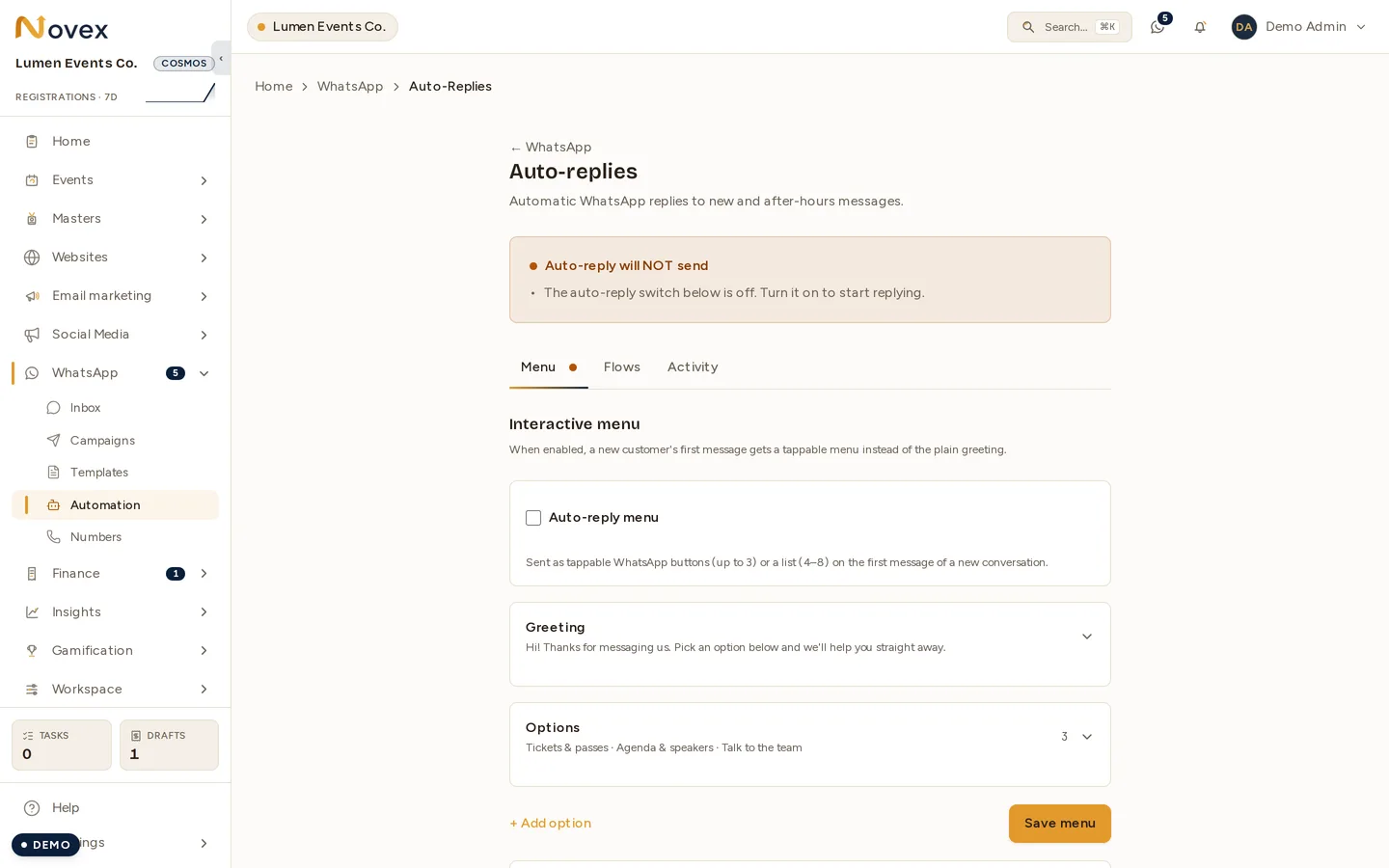
/t/<slug>/whatsapp/auto-replies, which needs the whatsapp.settings.manage
permission. The page has three tabs — Menu, Flows and Activity — and a
status card at the top that tells you exactly why the assistant is not replying,
when it is not.
Plans
Three different gates apply, and they are not the same one — and they are enforced by two different mechanisms, which is worth knowing if you go looking for them in the code:
| Capability | Needs | Enforced by |
|---|---|---|
| WhatsApp at all | Spectrum or above | the allowWhatsapp plan feature |
| The tappable menu | Flare or above (inside a workspace that already has WhatsApp) | a plan-tier check |
| Flows (scripted questionnaires) | Spectrum or above | a plan-tier check |
If a tier check cannot be completed, the assistant falls back to sending a plain warm greeting rather than failing — a person messaging you never meets silence because of a billing lookup.
The menu
The menu is the assistant’s main surface: a greeting followed by 2 to 8 tappable options. WhatsApp renders three or fewer as reply buttons and more than three as a list.
Each option carries, in both English and Arabic:
- the label the person taps
- the reply they get back
and can additionally do any of:
- apply a tag to that contact
- create a lead in the CRM
- start a flow
- hand off to a human, which reopens the thread for your team
Greeting text, the after-hours line and how often the greeting repeats are all set on the same tab.
Flows
A flow is a short scripted questionnaire made of three kinds of step: say something, ask an open question, or offer a choice. A menu option can start one, and the flow then owns the conversation until it finishes — that is why a person mid-flow does not get the greeting again.
Flows are authored on the Flows tab. They are scripted, not conversational: the assistant follows your steps in order.
What happens on an incoming message
The assistant works through a fixed order of precedence:
- A flow already in progress takes the message.
- A tap on a menu option resolves to that option’s reply, and applies whatever the option is configured to do.
- A new or re-engaged conversation gets the menu, if one is configured and enabled.
- Otherwise a plain greeting or, outside business hours, the after-hours notice — sent once per closed period rather than on every message.
- If a menu was configured but could not be sent, a plain warm greeting still goes out.
There is no silent dead end — the last step exists so a misconfiguration never results in nothing at all.
Tapped options are capped at five branch replies per conversation per hour. The cap is silent by design: the person is not told they hit a limit.
When the assistant stays quiet
Two separate things stop it, and they are worth knowing apart:
Human takeover. Once one of your team replies in a conversation, the assistant goes completely silent on that thread until an agent marks the conversation resolved. This is the rule that stops a bot talking over a colleague mid-exchange.
STOP. A person can text an exact opt-out word and be recorded as opted out:
| Words | |
|---|---|
| English | stop, unsubscribe, unsub, cancel, end, quit |
| Arabic | ايقاف, الغاء, توقف, الغاء الاشتراك |
They get an acknowledgement in their own language. Opting out is stored against the
phone number in canonical form, so 05…, +966… and the number WhatsApp
reports all resolve to the same person — opting out once is opting out everywhere.
Coming back requires an equally explicit word — start, subscribe, unstop,
ابدا, اشتراك. Ordinary replies like “yes” deliberately do not re-subscribe
anybody.
Tapping a menu button can never trigger STOP — only typed text is matched against those words.
What STOP governs. Opting out stops campaign sends to that number. Use human takeover, or turn the menu off, if what you want is for the assistant itself to stop replying in a thread.
The 24-hour window
WhatsApp only lets you send free-form messages within 24 hours of a person’s last message to you. The assistant is always replying to a message that just arrived, so it is inside that window by definition.
The limit shows up for your team, not the bot: if an agent tries to type a free reply after the window has closed, the message is recorded as failed with a note to send an approved template instead. Templates are the sanctioned way out — see Starting a conversation.
Measuring it
The Activity tab shows, over the last 30 days, how many times each menu option was picked — counted once per conversation per option, so one person tapping the same button repeatedly does not inflate it.
Permissions
| Action | Permission |
|---|---|
| View and configure the menu, flows and activity | whatsapp.settings.manage |
Next
- WhatsApp inbox — where handed-off conversations land
- Starting a conversation — templates and the 24-hour window
- WhatsApp campaigns — outbound sending