Connectors overview
Connectors are the third-party services Novex talks to on your behalf — payment gateways, WhatsApp, regional tax authorities, and your social accounts. They all live in one hub at Settings → Integrations, where you connect, disconnect, and watch the health of each one.
What’s in the hub
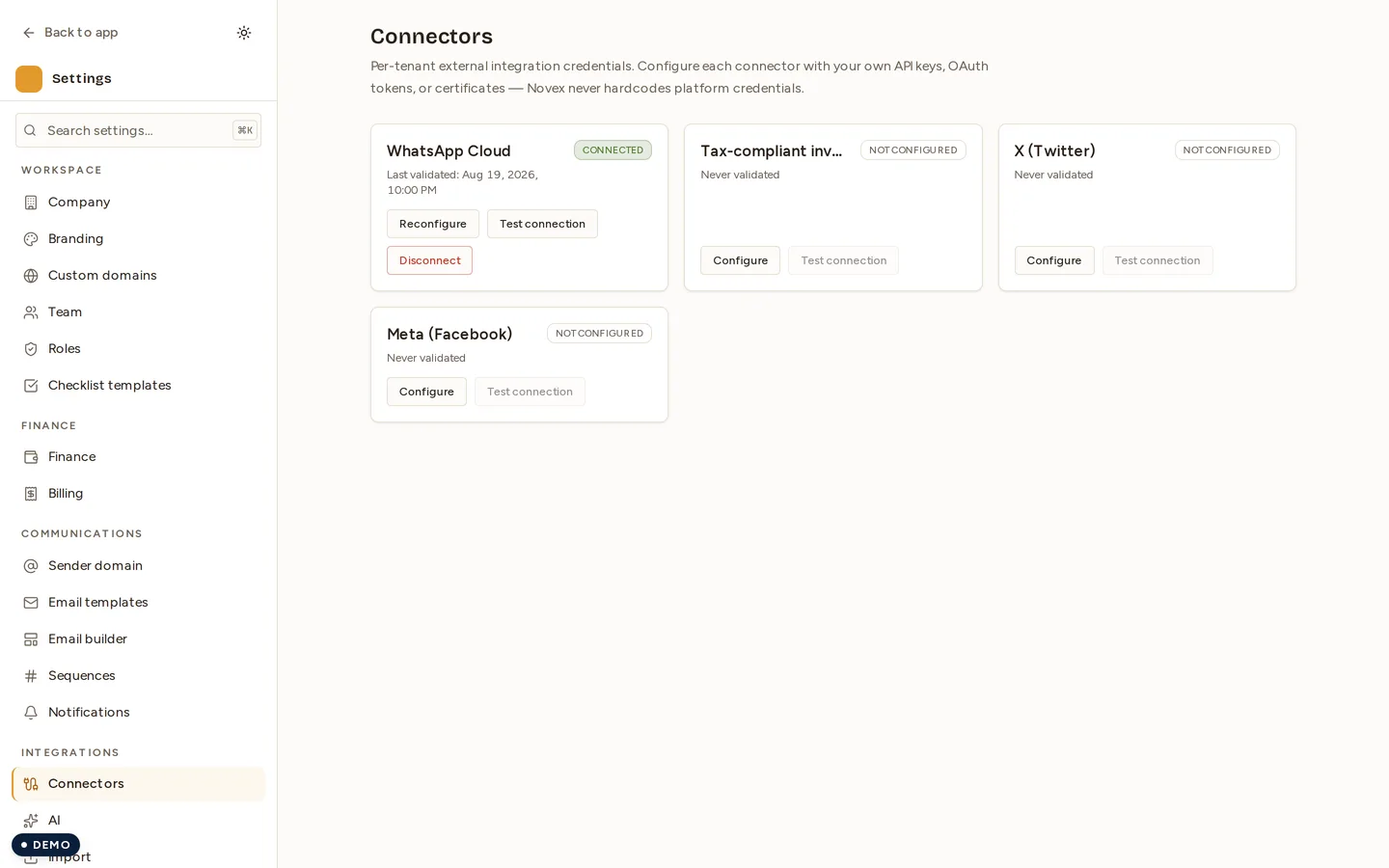
Each connector is a card with a status badge and a Configure button. The hub lists five today:
| Connector | Type | What it powers |
|---|---|---|
| WhatsApp Cloud | WHATSAPP_CLOUD | Outbound WhatsApp messages + campaigns |
| Tax-compliant invoicing | ZATCA_PHASE_2 | Fatoora Phase 2 signing, clearance, and reporting |
| X (Twitter) | SOCIAL_X | Posting to your X account |
| Meta (Facebook / Instagram) | SOCIAL_META | Posting to your Facebook Page + Instagram |
SOCIAL_LINKEDIN | Posting to your LinkedIn Page |
The screenshot above predates LinkedIn’s card and shows four. LinkedIn joined the hub once its Community Management review completed.
Not in the hub yet
One connector exists in Novex but is deliberately not shown — an unshipped integration with a card you can click is worse than no card at all, so it stays hidden until it works:
| Connector | Type | Waiting on |
|---|---|---|
| Moyasar | MOYASAR | Online card collection, coming after launch |
When and why to use it
Connect a service the first time you need the feature it powers — you don’t have to set everything up at once. A typical order:
- Tax-compliant invoicing if you invoice in Saudi Arabia (required before issuing).
- WhatsApp before your first WhatsApp campaign or reminder.
- Social accounts when you begin scheduling event promotion posts.
Connecting a connector
- Go to Settings → Integrations.
- Find the connector card and click Configure.
- Follow the per-connector setup flow (each is documented on its own page — see the links below). Payment and tax connectors ask for credentials; WhatsApp and social connectors open an OAuth / embedded-signup popup.
- On success the card flips to Connected and the feature unlocks across Novex.
Reading connector status
Each card shows one of:
- Connected — credentials valid, last health check passed.
- Action needed — connected but a recent health probe failed (expired token, revoked grant, rejected key). Re-run the setup flow.
- Not connected — nothing configured yet.
Novex runs a background health check on the connected services so a silently expired token surfaces as Action needed before it breaks a live send.
Disconnecting
Open the connector and click Disconnect. This removes the stored credentials or revokes the OAuth grant and immediately stops Novex using the service. Reconnecting later is the same flow as the first connect — nothing is retained after a disconnect, so you re-enter credentials or re-authorize.
Tips & limits
- Connectors are per-tenant. Each workspace connects its own accounts; nothing is shared between tenants.
- Credentials are encrypted at rest in the tenant secret-vault — they are never shown back to you in full after saving.
- Some connectors have an environment toggle (Fatoora sandbox/production). Verify you’re in the right environment before going live.