Live games
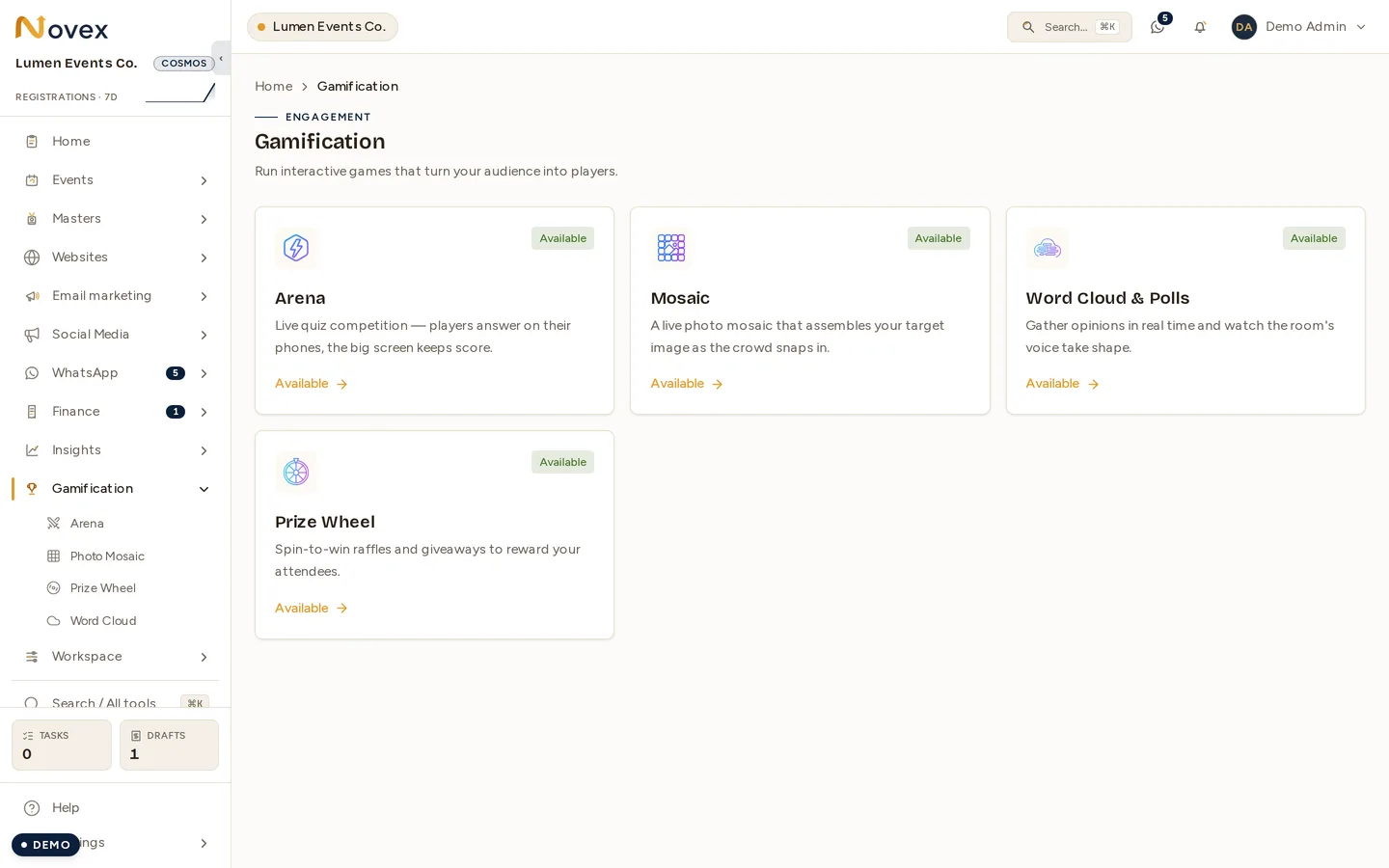
Three big-screen games your attendees play from their phones. Each one is a board you create against an event; attendees join by scanning a QR code, and you drive the display from the room.
Like Arena, live games need the Flare plan or above.
What each game is
| Game | What happens |
|---|---|
| Mosaic | You upload a target picture. Attendees submit photos, and each approved photo becomes one colour-matched tile — the target image slowly appears on screen, built out of the audience’s own photos. |
| Word Cloud | You run a sequence of prompts — free text, multiple choice or a rating — and answers aggregate live on the big screen. |
| Prize Wheel | You configure the prize segments and their odds; attendees enter by scanning, and you spin the wheel on the present screen. |
Creating a board
Each game lives at its own route, and all three follow the same shape — a list of boards, a New form, and a board detail page with the join QR and the run controls.
| Game | Routes |
|---|---|
| Mosaic | /t/<slug>/gamification/mosaic, /mosaic/new, /mosaic/<boardId> |
| Word Cloud | /t/<slug>/gamification/wordcloud, /wordcloud/new, /wordcloud/<boardId> |
| Prize Wheel | /t/<slug>/gamification/prizewheel, /prizewheel/new, /prizewheel/<boardId> |
Every board belongs to one event, and you can run several boards on the same event — a Word Cloud for the opening session and another for the closing panel is the normal case, not a workaround.
Every board runs Draft → Live → Ended. Ended is final: start a new board rather than reopening an old one.
Mosaic settings
Set when you create the board: the target image, the starting grid density (small, medium or large), whether a nickname is required (on by default), an optional cap on submissions per device, and the tint opacity of unfilled cells on the big screen.
Word Cloud settings
The board carries the title, the event and the nickname requirement. The prompts
themselves are authored separately on the board page, where you order them and
choose which one is currently active. A prompt is free-text, multiple choice or a
rating. Results for any prompt stay readable afterwards at
/wordcloud/<boardId>/prompts/<promptId>/results.
Prize Wheel settings
You define the segments: a label, a relative weight that sets its odds, an optional colour, and a no-prize flag for losing slices. Attendees get one entry per device.
The draw is decided on the server, weighted by those numbers, and each result is recorded — the wheel animation shows the outcome, it does not choose it.
Moderation
Mosaic and Word Cloud have moderation consoles. Prize Wheel does not — there is nothing submitted to moderate.
The two consoles do different jobs, and the difference matters when you are standing in the room:
- Mosaic — approval before anything appears. Submitted photos sit pending until
someone approves them; approving is what assigns the photo to a grid cell. Nothing
reaches the screen unreviewed. Console:
/mosaic/<boardId>/moderate. - Word Cloud — a backstop after the fact. Submissions are profanity-filtered
automatically and appear live and immediately. The console lets you pull
something that got through; it is not a pre-approval queue. Console:
/wordcloud/<boardId>/moderate.
If you need every word vetted before the audience sees it, Word Cloud is not the tool for that today — use Mosaic’s model, or a survey.
Permissions
| Action | Permission |
|---|---|
| View the hub, and Mosaic boards | arena.read |
| Create Mosaic boards | arena.manage |
| Moderate a Mosaic board | arena.host |
| View Word Cloud boards and results | wordcloud.read |
| Create and moderate Word Cloud boards | wordcloud.manage |
| View Prize Wheel boards | prizewheel.read |
| Create Prize Wheel boards | prizewheel.manage |
Mosaic shares Arena’s permissions rather than carrying its own.