Document numbering
Document numbering controls how Novex auto-generates the reference number for each document type — quotations, invoices, purchase orders, events, and leads. You choose the prefix, the separator, the date segment, and the zero-padded counter, per module, so numbers match your house style: PO/2026/0001, INV-26-0001, or EV0001.
Where to find it
Go to Settings → Sequences. There is one card per document type, each with its own Save button and a live preview of the next number that updates as you type.
Fields per document type
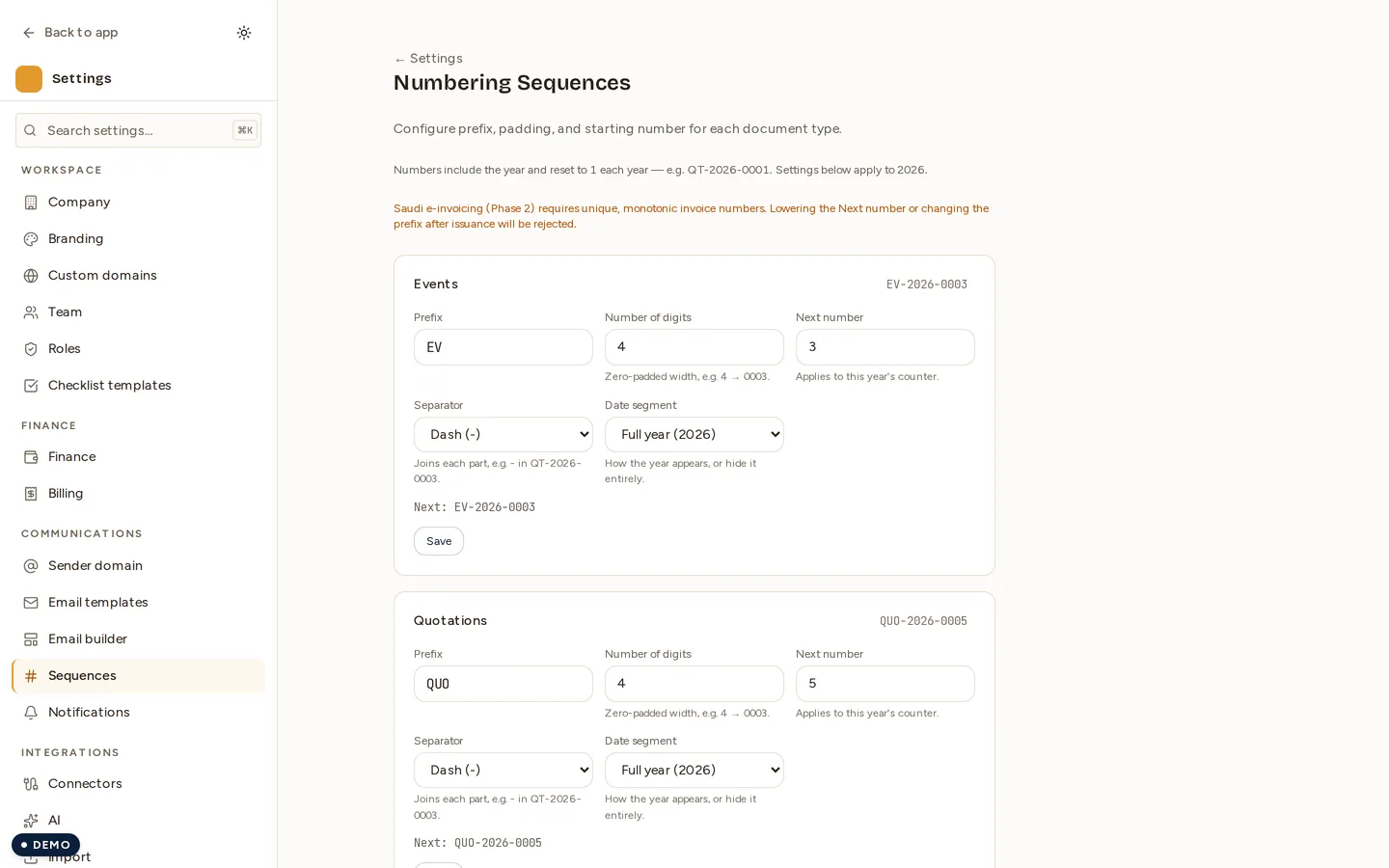
- Prefix — the leading code, for example
QT,INV,PO,EV, orLEAD. - Separator — the character between segments: dash (
-), slash (/), underscore (_), dot (.), or none. A custom character is also accepted. - Date segment —
YYYY(full year, e.g.2026),YY(two digits, e.g.26), orNone(no date at all). - Number of digits — the zero-padding width (for example, 4 digits gives
0001). - Next number — the next counter value to be issued.
How the number is built
Novex joins the non-empty segments — prefix → date → padded counter — with your chosen separator, so the same controls produce very different styles:
| Prefix | Separator | Date segment | Digits | Result |
|---|---|---|---|---|
PO | / | YYYY | 4 | PO/2026/0001 |
INV | - | YY | 4 | INV-26-0001 |
QT | - | YYYY | 4 | QT-2026-0001 |
EV | none | None | 4 | EV0001 |
The live preview on each card (for example “Next: PO/2026/0003”) always reflects the current settings and the current year’s counter. The page is available in both English and Arabic, and every document type routes through the same generator, so the behaviour is consistent everywhere.
Year-aware numbering
When the date segment is YYYY or YY, document numbers carry the year and the counter is year-aware:
- The counter resets to 1 at the start of each calendar year (the first number issued in a new year starts a fresh counter).
- Your customised prefix, separator, date segment, and digit count carry forward across the year roll-over.
- With the date segment set to
None, the counter simply keeps climbing — there is no per-year reset.
Event numbers
Events now mint a proper document number on creation through the same Sequences generator (the event module), instead of showing a raw internal code. Configure the event card’s prefix / separator / date / digits just like any other module, and new events are numbered to match — for example EV-2026-0001 or EV0001.
Guardrails
- Changes apply to NEW records only. Editing a sequence never re-numbers documents that already exist — issued numbers are permanent.
- Next number can only be raised, never lowered. Re-issuing a previous number would create duplicate invoice numbers and break e-invoicing clearance, so the server rejects any lowered value.
- The prefix is locked once any document has been issued under it. A tax / audit warning banner explains why the field can no longer be changed.
Permissions
| Action | Permission |
|---|---|
| View document numbering | settings.read |
| Save document numbering | settings.write |