Support
The fastest way to reach us from inside Novex is the Help page — a contact form that reaches the Novex team without leaving the product. From the marketing site, the Contact form does the same. For everything else, the channels below are the official ones.
In-app Help page
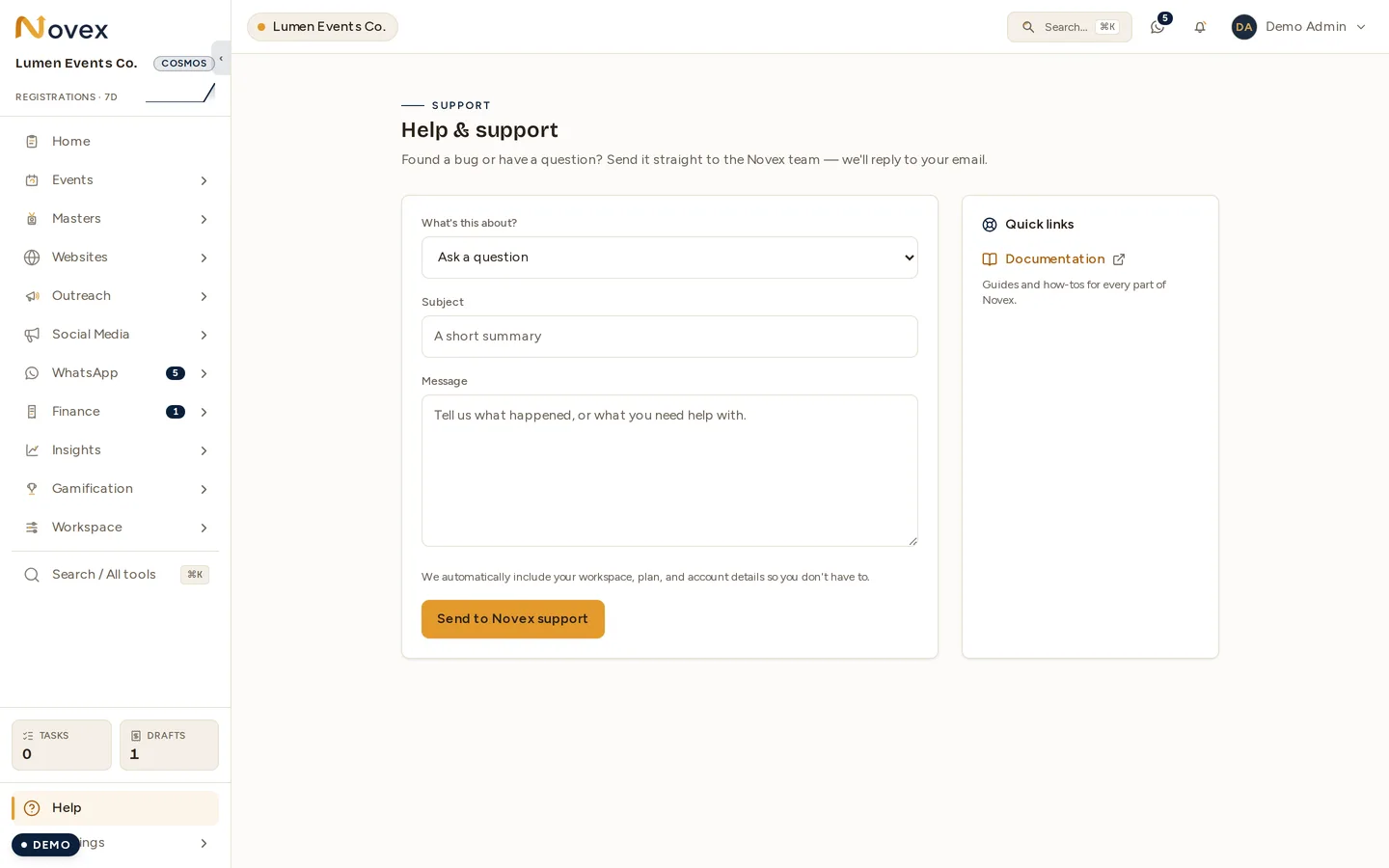
Every workspace has a Help entry in the sidebar (the Help & support page). It’s open to any signed-in member — no special permission — so anyone who hits a bug or has a question can reach us directly.
Fill in the form:
- What’s this about? — pick a category: Report a bug, Ask a question, Billing & subscription, or Something else.
- Subject — a short summary.
- Message — what happened, or what you need help with.
Novex automatically attaches your workspace, plan, and account details, so you don’t need to include them yourself. Sending the form creates a support ticket and emails the Novex team, who reply to your account email. The form is rate-limited, so if you’ve sent several messages in a row you may be asked to wait a little before sending another.
The Help page also carries Quick links — to this documentation site, and to your workspace’s own knowledge-base articles when you’ve published any.
Channels
| Channel | Use it for |
|---|---|
| support@nov3x.com | Bug reports, how-do-I questions, training requests. |
| billing@nov3x.com | Plan changes, invoice/PO questions, refunds. |
| legal@nov3x.com | Data Processing Agreement, contract signature, NDA. |
| privacy@nov3x.com | Data export, account deletion, PDPL / GDPR access. |
| security@nov3x.com | Suspected vulnerabilities, account takeover, breach disclosure. |
| +1 (307) 466-7333 | Phone. Best for urgent escalations. Leave a message any time and we call back. |
Support response
You can send a request at any time; there is no published response-time commitment. The inbox is always open, but it is not a staffed 24-hour desk. There is no business-hours window and no single time zone: our customers are worldwide and our targets are measured in elapsed hours, not working hours.
We aim to reply within 24 hours, on every paid plan. Cosmos customers also have a named Customer Success Manager.
These are targets, not contractual commitments, and no service credit attaches to them. We will publish them as commitments once our support system records the time of first reply.
Beam (free) is supported through this documentation and the status page.
For a total outage — Novex unreachable for all of your users — we treat it as our highest priority, post to the status page as soon as we have confirmed it, and keep that page updated until it is resolved.
What to include in a ticket
A ticket with these details closes 3× faster on average:
- Tenant slug (the part after
/t/in your URL). - What you were trying to do in one sentence.
- What happened — exact error message if any, or “the button did nothing”.
- Screenshot if visual, or browser console log if you’re comfortable sharing one.
- Time in your local zone — helps us pull the right log slice.
Status page
https://status.nov3x.com is the source of truth for ongoing incidents and scheduled maintenance. Subscribe to email or webhook notifications from there.
Self-serve before you ticket
- Every authenticated page has a ? Help button — opens the relevant doc article in a side panel.
- The /admin tenant detail page (super-admin only) shows a recent-error timeline that often surfaces the cause before a ticket lands.
- Settings → Health in your tenant shows the integration statuses (e-invoicing cert validity, WhatsApp connection, Resend API key, etc.). If a feature isn’t working, check here first.
Security disclosure
If you’ve found a security issue, please email security@nov3x.com with “Vulnerability disclosure” in the subject. We acknowledge within 24 h and work with you on a coordinated disclosure timeline. Bug bounties are not formally programmed yet but we credit researchers publicly with their consent.