Workshop selection
For multi-day events, workshop selection lets already-registered attendees choose which workshop sessions they want to attend. Each eligible attendee gets a personal link by email, opens their own picker, and selects sessions grouped by day. Workshop sessions are hidden from the public agenda — they show up only in the attendee’s picker.
What it is
Workshops are agenda sessions you flag as “workshop”. Unlike normal sessions, they don’t appear on the public agenda page. Instead, each eligible attendee receives a personal picker link. They open it, see the workshop sessions grouped by day, pick the ones they want across all the days, and submit. It’s a clean way to gather “who’s going to which breakout” without publishing your breakout list to the whole world.
Use it when a multi-day event has parallel breakouts or limited-interest sessions and you want a per-attendee headcount before show day.
Setup
-
Create the workshop sessions. In the event’s Agenda editor, add the sessions and toggle “This is a workshop” on each one. Workshop sessions are hidden from the public agenda and appear only in the attendee’s picker.
-
Mark eligible ticket types. Set the relevant ticket type(s) as “Workshop eligible” so only those attendees receive a picker link. A ticket type that isn’t flagged is simply skipped.
-
Generate the personal picker links. For now this is an operator step: the Novex team runs the token backfill script —
scripts/backfill-workshop-selection-tokens.ts <eventId>. Run it with--dry-runfirst to preview which attendees would get a link, then run it for real. The script is re-runnable (it only creates links for eligible attendees who don’t already have one) and idempotent (it never creates duplicates), so it’s safe to run again after more people register.This step is currently run by the Novex team via a script — there’s no “Generate links” button in the UI yet. Ask your Novex contact to run the backfill once your workshop sessions and eligible ticket types are set.
-
Send the invite email. In the event’s Email tab, compose a campaign to the eligible segment and insert the
{{workshop_picker_url}}merge token. It resolves to each recipient’s own personal picker link, so one email reaches everyone with the right link. Send it to the eligible audience. -
Attendees pick. Each attendee opens their link, sees the workshop sessions grouped by day, picks any or all of them across the days, and submits. They get a confirmation email, and can re-open the same link to edit their picks until the cutoff.
Good to know
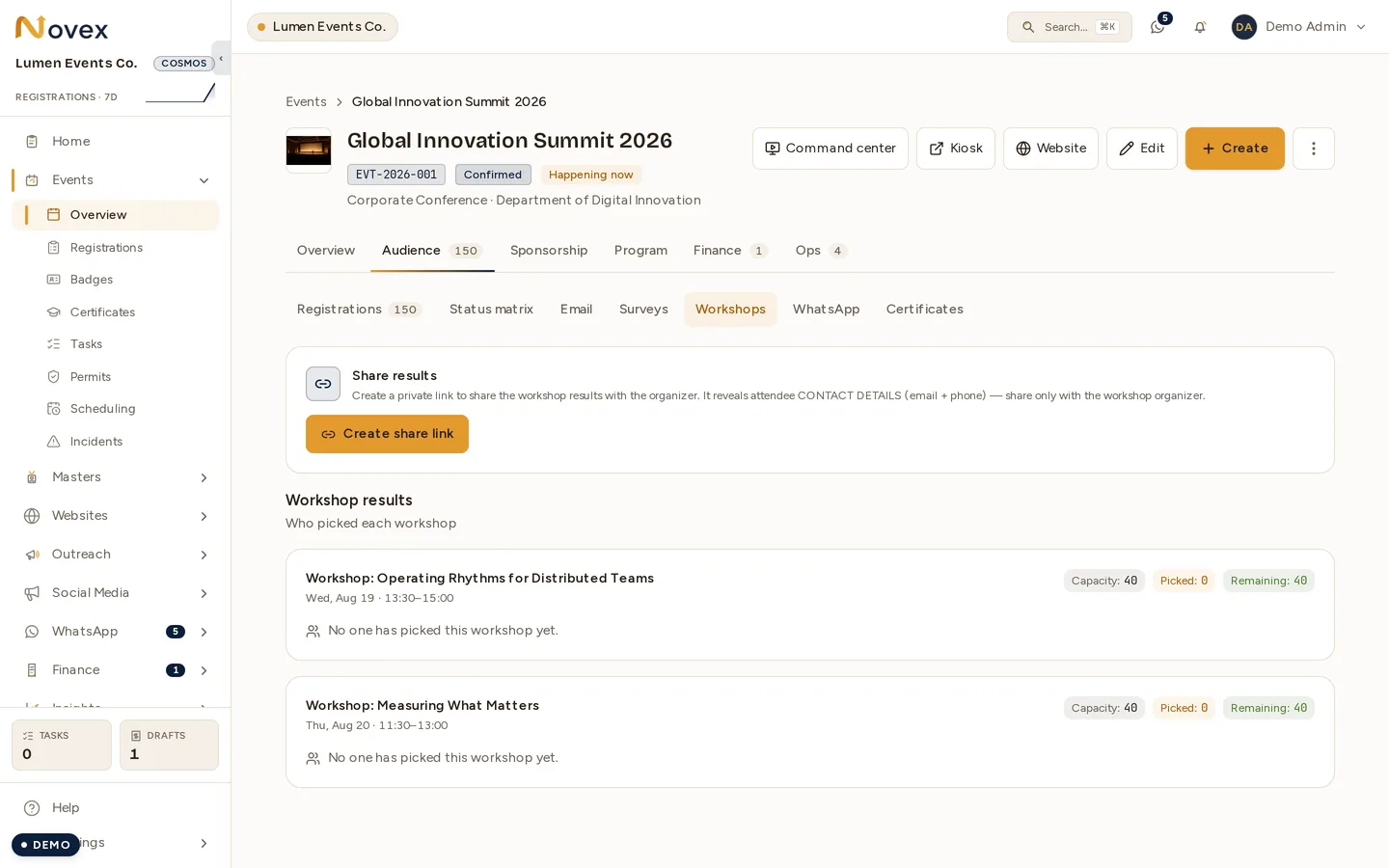
Workshop results is where you watch the picks land. Each workshop shows its capacity, the number of attendees who have chosen it, and the remaining places. Both workshops above are still at zero — that is what the panel looks like before the invite goes out.
-
Multi-select, and capacity is optional but real — attendees can pick as many workshops as they like across days. A session with a capacity set will turn people away once it is full: the picker refuses the choice rather than overbooking, and the check is taken under a lock so two people choosing the last seat at the same moment cannot both get it. Leave a session’s capacity empty and it is genuinely unlimited — that is the special case, not the rule.
-
Editable until the cutoff — selections can be changed up to the cutoff. By default the cutoff is the event start date; if you set a custom “selection closes at” time, that wins. After the cutoff the link becomes read-only.
-
Idempotent and safe — re-opening the link always shows the attendee’s current picks, and re-submitting never duplicates anything. The confirmation email is sent once, on the first confirmation — editing the picks later does not send another email.
-
Confirmation email language — the confirmation email is currently sent in English (Arabic is planned).
-
The picker page is bilingual — it renders in English or Arabic based on the attendee’s browser language.