WhatsApp Business
Novex sends WhatsApp messages — registration confirmations, reminders, magic links, sponsor updates — through your tenant’s own Meta WhatsApp Business account. You connect once, submit templates for approval, and Novex handles the outbound flow.
Availability
WhatsApp Business — connecting via Facebook (Meta’s Embedded Signup) and sending campaigns — requires Spectrum or above: Spectrum, Aurora and Cosmos.
Flare does not include WhatsApp. The entry tier cannot connect a WhatsApp Business account or send WhatsApp campaigns. This is enforced on the pages, on the server actions and on the API — a below-Spectrum request is refused rather than just hidden from the UI. See Billing & plans.
How many messages you get
| Plan | WhatsApp messages / month |
|---|---|
| Beam, Flare | — (not included) |
| Spectrum | 1,000 |
| Aurora | 1,000 |
| Cosmos | No monthly cap |
⚠️ There is also a daily burst cap, and on Spectrum and Aurora it is the same number as the monthly allowance. So nothing stops you sending all 1,000 in a single day — and if you do, you are done for the rest of the billing period. If you are planning a big send, plan it against the month, not the day.
The monthly allowance resets with your billing period. If you need more than it allows, talk to us before the event rather than during it.
How the connection works
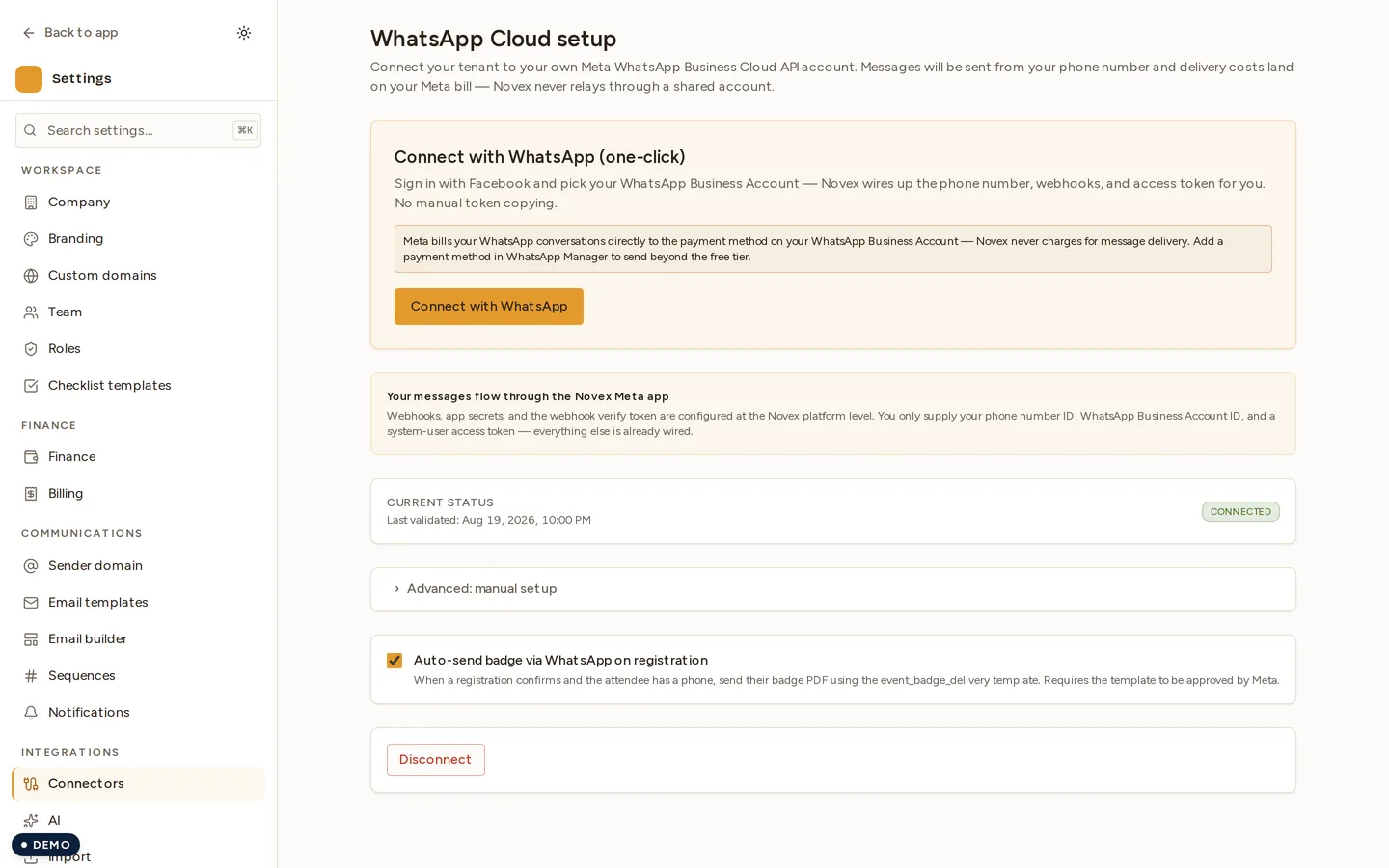
Novex maintains one Meta Developer App at developers.facebook.com. Each tenant grants their WABA (WhatsApp Business Account) as an asset to that app. The webhook URL is platform-wide and signed with Novex’s app secret — no per-tenant webhook config needed on your side.
One-time setup
- Verify your business with Meta. This is a one-time interaction with Meta’s Business Verification UI; allow 1-3 business days.
- Create or attach a WABA in your Meta Business Manager. The phone number must be a SMS-verified or voice-verified business number.
- In Novex, go to Settings → Integrations → WhatsApp.
- Click Connect WABA. The flow opens Meta’s “Embedded Signup” overlay — sign in with the Facebook account that owns the WABA, pick which numbers to grant Novex access to, and confirm.
- The connection lands in Novex with status
ACTIVE. You can disconnect at any time from the same page.
Submit message templates
Meta requires every outbound non-conversational message to be a pre-approved template. Novex’s template editor:
- Pick a category:
UTILITY/MARKETING/AUTHENTICATION. - Pick a language (English / Arabic / both — submit two separate templates).
- Compose the body with placeholders:
{{1}}{{2}}etc. - Add a header (text or media), optional footer, optional buttons.
- Submit to Meta. Approval typically takes minutes for
UTILITYandAUTHENTICATION; up to 24 h forMARKETING.
Once approved, the template appears in Novex with status APPROVED and is
available in send flows.
Send a campaign
- Pick the audience: event registrants, sponsor contacts, or marketing contacts.
- Pick an approved template.
- Fill the placeholders (
{{1}}= first name,{{2}}= event name, etc.). - Schedule for now or a future time.
- Send.
Novex queues each message via BullMQ and rate-limits to stay under Meta’s per-WABA throughput cap (Meta classifies you in tiers 250 → 1k → 10k → 100k → unlimited based on quality + opt-ins).
Quality and opt-outs
- Every contact has a per-list opt-out flag. The campaign send-loop skips opted-out recipients silently — they’re not even queued.
- Inbound replies hit the platform webhook and surface in the recipient’s contact record in Novex.
- If Meta lowers your quality rating (red flag in the WhatsApp Manager UI), Novex flags it on the Integrations dashboard so you can throttle back voluntarily.
Troubleshooting
- “Number not connected” — Re-run the embedded-signup flow. Often a number was added to the WABA after the initial grant; the asset list needs a refresh.
- Template stuck
PENDING— Meta is slow on first submissions from a new account. Wait 1-24 h before resubmitting; resubmits don’t accelerate review. - Webhook events not arriving — Confirm the WABA appears in Settings → Integrations → WhatsApp → Granted assets. If it’s missing, the asset grant lapsed; redo the embedded signup.