Merging duplicate people
The same human can end up in the People master twice, and Novex is deliberately cautious about it: it will find candidates for you, but it will never merge them on its own.
Read Master records first for why a person exists once and every event links to them.
Why duplicates happen at all
They happen less than you would expect, because the person record is resolved rather than blindly created. When somebody registers, is imported, buys a ticket or is added at the kiosk, Novex looks for an existing person — by verified mobile first, then normalised email, then normalised phone — and creates a new record only when nothing matches. Filling in a blank field never overwrites a value that is already there.
When the match is ambiguous, nothing is guessed. The case goes to an identity review queue instead of being merged automatically.
Finding duplicates
Candidates are ranked by confidence:
| The label you see | What matched |
|---|---|
| High confidence | The last nine digits of the mobile number |
| Worth a look | The same normalised name and company, or the same name and email local-part |
These are candidates, not conclusions. Two people at one company can genuinely share a name. A human confirms every merge.
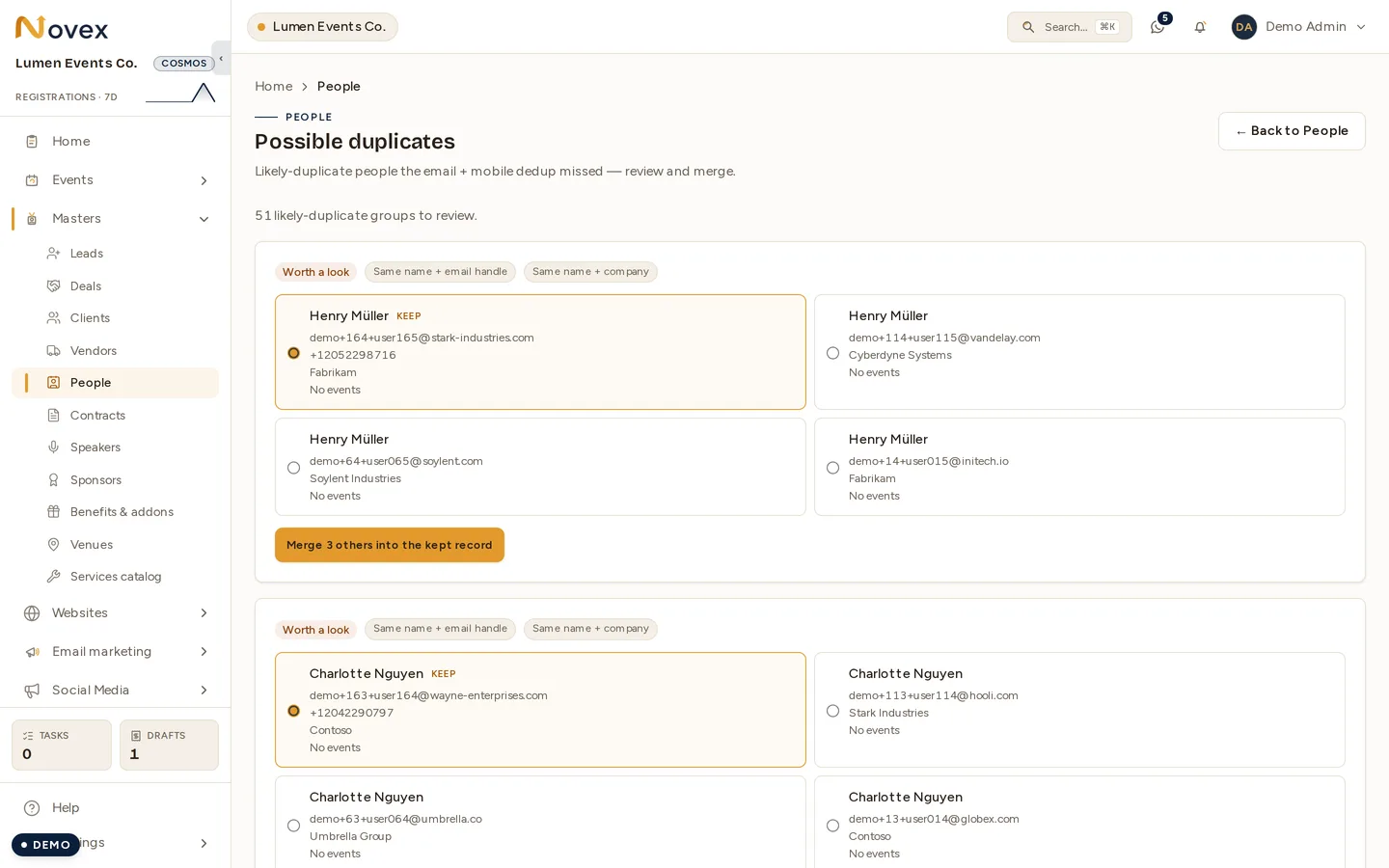
Merging
You pick the record to keep. The merge then re-points the duplicates’ registrations onto the kept person and archives the duplicates.
Nothing is hard-deleted. The duplicate rows are archived, so a merge is recoverable.
What a merge does not move
A merge today moves registrations only. It does not carry across:
- company affiliations — a person’s link to a client, with their title and dates
- speaker and contact profiles built on the duplicate
- tag assignments
- a linked staff-account connection
- links from quotations, invoices, deals, contracts and sponsor records
Those stay pointing at the archived duplicate. So before you merge, check which of the two records carries the affiliations, tags and documents, and keep that one — the merge will bring the registrations to it, but it will not bring anything else back the other way.
This is the one thing to get right on this page. Everything else about a merge is reversible; choosing the wrong record to keep means re-creating links by hand.
Archiving
Archiving a person is a soft delete — the row stays, flagged as archived, and drops out of the lists.
Directory rows that exist only as a client contact, with no person record behind them, are skipped, and the result tells you how many were skipped rather than silently doing nothing.
Exporting
The People list exports to CSV — either everything matching your current filters, or just the rows you selected. Export needs only read access.
Erasing somebody’s data
Merging and archiving are housekeeping. A erasure request under PDPL or GDPR is a different thing with its own flow, including a preview of what will be erased — see Data export & deletion. There is no hard-delete button in the People master.
Permissions
| Action | Permission |
|---|---|
| View people, review duplicates, export CSV | registration.read |
| Merge, archive, create and edit | registration.write |
| Link a person to a client company | clients.write |
Next
- Master records — how masters and event links fit together
- Data export & deletion (PDPL/GDPR)
- Managing registrations